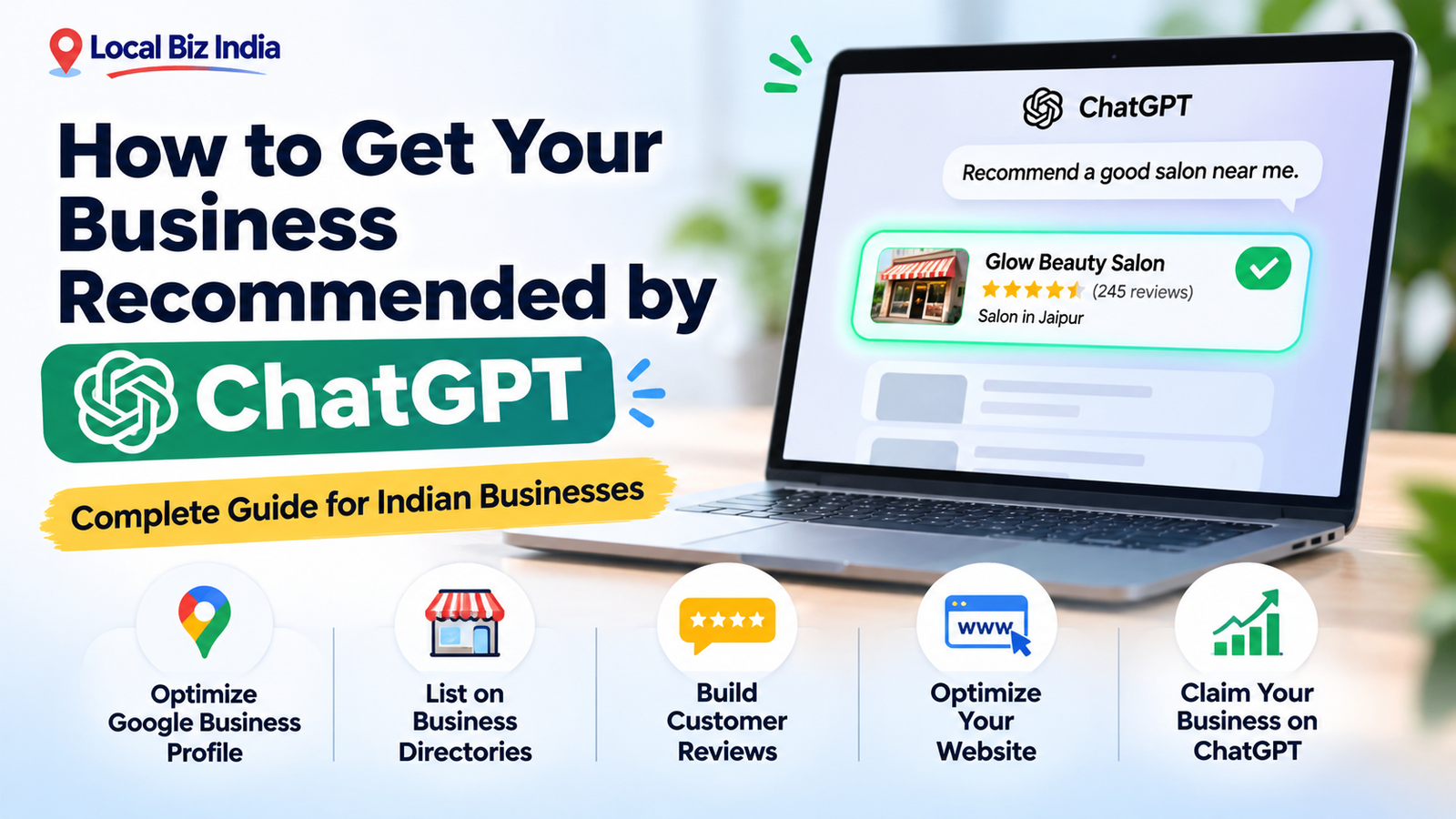
Want to know how to get business on ChatGPT and reach more potential customers? As more people use AI tools to discover local shops, restaurants, salons, and services, businesses have a new opportunity to improve their online visibility.
For example, someone might ask ChatGPT, "Which is the best salon near me?" or "Recommend a reliable plumber in Delhi."
If your business has accurate information, a strong online presence, and helpful website content, it may have a better chance of being discovered.
In this guide, you'll learn how ChatGPT business recommendations work, how to improve your visibility, and what small businesses in India can do to get started.
How Does ChatGPT Recommend Local Businesses?
ChatGPT can help users discover and compare businesses based on their questions, location, preferences, and available information.
Unlike a traditional business directory, ChatGPT can provide conversational recommendations and explain why certain businesses may meet a customer's needs.
However, there is no guaranteed method to make ChatGPT recommend your business.
Where Does ChatGPT Get Business Information?
When ChatGPT searches the web, it can use information from websites, search providers, business listings, and other available sources.
Relevant information may include:
-
Business name, location, and contact details.
-
Products and services offered.
-
Website descriptions and useful content.
-
Publicly available customer reviews.
-
Business opening hours and service areas.
-
Information from trusted online sources.
According to OpenAI's ChatGPT Search documentation, location information can also help provide more relevant results when users search for nearby businesses.
What Factors Can Influence ChatGPT Business Recommendations?
OpenAI does not publish a complete ranking formula for organic business recommendations.
However, keeping your information accurate, accessible, and relevant can help search systems understand what your business offers.
Important areas to focus on include:
-
Clear business descriptions.
-
Accurate location and contact information.
-
Consistent business listings.
-
Helpful service and product pages.
-
Authentic customer feedback.
-
An accessible, regularly maintained website.
These are useful visibility practices, not guaranteed ChatGPT ranking factors.
How to Get Your Business on ChatGPT: Step-by-Step Guide
If you're wondering how to get your business recommended by ChatGPT, start by strengthening your online business presence.
The following six steps are practical ways to make your business information easier to discover and understand.
Step 1 – Create and Optimize Your Google Business Profile
Your Google Business Profile is an important foundation for local business visibility.
It allows customers to find useful information about your business through Google Search and Maps.
To optimize your profile:
-
Create or claim your Google Business Profile.
-
Enter your correct business name and category.
-
Add your address or service area.
-
Update your phone number and working hours.
-
Upload genuine business photographs.
-
Describe your main products and services.
-
Respond professionally to customer reviews.
Google confirms that its local search results consider relevance, distance, and prominence. Read the official Google Business Profile guidance.
A complete Google profile is useful for local discovery, although it does not guarantee inclusion in ChatGPT recommendations.
Step 2 – List Your Business on Trusted Online Directories
Business directories help people discover companies by category, service, and location.
Creating accurate listings on relevant platforms can also increase the number of places where customers can find reliable information about your business.
For Indian businesses, consider directories that serve your industry or location.
Your profile should include:
-
Correct business name.
-
Complete address or service location.
-
Working phone number.
-
Website link, if available.
-
Relevant business category.
-
Short, informative description.
-
Updated products or services.
You can also explore Local Biz India to discover businesses and relevant listing opportunities.
Remember that creating a directory listing does not automatically place your business in ChatGPT results.
Step 3 – Keep Your Business Name, Address, and Phone Number Consistent
Consistent business information helps customers identify the correct company across different platforms.
For example, if your business is called "Sharma Dental Clinic," avoid using different names, outdated phone numbers, or incorrect addresses across your profiles.
Check these details regularly:
-
Name: Use your genuine business name.
-
Address: Keep location details accurate.
-
Phone: Display your active business number.
-
Website: Link to your official website.
-
Hours: Update holiday and seasonal opening times.
This practice is commonly called NAP consistency, referring to name, address, and phone number.
Step 4 – Build Genuine Customer Reviews and Online Mentions
Customer reviews help potential buyers understand other people's experiences with your business.
Encourage satisfied customers to share honest feedback on relevant review platforms.
For example, a restaurant can request reviews after a meal, while a salon can ask customers to describe their experience after an appointment.
You should:
-
Request genuine customer reviews.
-
Respond politely to positive and negative feedback.
-
Avoid purchasing fake reviews.
-
Keep your business information accurate.
-
Build legitimate mentions through local publications and community websites.
Reviews and online mentions can strengthen your broader reputation, but no specific number of reviews guarantees a ChatGPT recommendation.
Step 5 – Optimize Your Website for ChatGPT Search
A clear website helps visitors and search systems understand your business.
Each important service should have a useful page explaining what you offer, where you operate, and how customers can contact you.
For example, a cleaning company in Pune could create pages about home cleaning, office cleaning, and deep cleaning services.
Include:
-
Descriptive page titles and headings.
-
Clear service descriptions.
-
Accurate contact and location information.
-
Frequently asked questions.
-
Relevant photographs.
-
Easy navigation and mobile-friendly pages.
Focus on answering customer questions rather than repeating keywords excessively.
Step 6 – Make Your Website Accessible to AI Search Crawlers
Even useful content may be difficult to discover if search crawlers cannot access your website.
OpenAI uses a crawler called OAI-SearchBot to discover content for ChatGPT search.
Ask your website developer to check whether:
-
Important pages are publicly accessible.
-
Your robots.txt file permits appropriate crawler access.
-
Security settings are not unintentionally blocking OAI-SearchBot.
-
Service pages load correctly.
-
Important information is visible without login requirements.
You can review OpenAI's official ChatGPT Search guidance.
Allowing crawler access makes content eligible for discovery, but does not guarantee inclusion in ChatGPT answers.
Can You Add or Claim Your Business Directly on ChatGPT?
Yes. In November 2026, OpenAI introduced Businesses in ChatGPT, allowing eligible businesses to claim and manage business information through Business Hub.
This is a significant development for businesses that want greater control over the information customers may see when researching them through ChatGPT.
What Is ChatGPT Business Hub?
Business Hub is an official interface where eligible businesses can claim profiles, manage business details, and view available engagement insights.
To get started:
-
Sign in to ChatGPT.
-
Open Business Hub from the sidebar, if available.
-
Search for your business.
-
Select the matching business profile.
-
Complete an offered ownership-verification method.
-
Complete the required identity verification.
-
Update available business information after approval.
Business owners may be able to edit descriptions, websites, service categories, and other supported details.
Read the official guide to setting up your business on ChatGPT.
Who Is Eligible to Claim a ChatGPT Business Profile?
OpenAI states that eligible businesses in locations where ChatGPT is available can claim business profiles.
However, not every business or business category is eligible, and verification is required.
For Indian businesses, the best approach is to check Business Hub directly for available claiming options.
Business profile claiming is different from creating a Business Agent. As of November 2026, Business Agents have separate eligibility requirements focused on certain US ecommerce and online service businesses.
Most importantly, claiming a business profile does not guarantee that ChatGPT will recommend it.
How to Optimize Your Business Website for ChatGPT Search
Businesses often focus only on adding their company name to online platforms.
However, clear website content is equally important because it explains what your business does and which customer needs it serves.
Use Local SEO Keywords and Location-Specific Content
Include relevant location terms naturally in your website content.
For example:
|
Business Type |
Example Keyword |
|
Beauty salon |
Bridal makeup services in Jaipur |
|
Restaurant |
Family restaurant in Patna |
|
Dental clinic |
Dental clinic in Lucknow |
|
Electrician |
Electrician services in Noida |
|
Photography studio |
Wedding photographer in Delhi |
Create dedicated location pages only when your business genuinely serves those areas.
Avoid publishing multiple nearly identical city pages simply to attract searches.
Add FAQs and LocalBusiness Schema Markup
Frequently asked questions make information easier for customers to understand.
For example, a salon website might answer:
-
Do you provide bridal makeup?
-
What are your opening hours?
-
Is advance booking required?
-
Which areas do you serve?
You can also implement LocalBusiness structured data to describe your business's address, hours, and other details in a machine-readable format.
Google provides official LocalBusiness structured data documentation.
Schema markup helps supported search systems understand information, but it is not a guaranteed ChatGPT ranking technique.
Create Helpful Content That Answers Customer Questions
Useful content can attract customers researching services before making a decision.
Instead of publishing only promotional articles, create guides that solve real problems.
For example:
-
A restaurant can publish a guide to choosing catering services.
-
A salon can explain bridal makeup packages.
-
A clinic can answer common appointment questions.
-
A repair shop can explain common appliance problems.
Include accurate, original information based on your expertise.
How to Check If ChatGPT Recommends Your Business
After improving your online visibility, test whether your business appears in relevant ChatGPT answers.
Keep in mind that recommendations may vary depending on the user's question, location, available sources, and search context.
Test Your Business with Local Search Questions
Open ChatGPT and ask questions similar to those your customers might use.
Examples include:
-
"Recommend beauty salons in Jaipur."
-
"Where can I find a reliable electrician in Noida?"
-
"Suggest family restaurants in Patna."
-
"Find a wedding photographer in Delhi."
Record whether your business appears and whether the information is correct.
Testing periodically can help you identify inaccuracies, although individual tests are not reliable measures of overall ranking.
Compare Your Business with Competitors in ChatGPT Results
Look at the businesses mentioned in relevant answers.
Compare their publicly visible information with yours, including:
-
Business descriptions.
-
Service details.
-
Websites.
-
Customer reviews.
-
Location information.
-
Online directory listings.
Use the comparison to identify missing information rather than copying competitors' content.
Track ChatGPT Mentions and Website Traffic
If you have an approved Business Hub profile with access to Insights, you may be able to see aggregate mentions, website clicks, and discovery topics.
You can also check website analytics for referral visits from ChatGPT.
Monitor:
-
ChatGPT-related website visits.
-
Enquiries received.
-
Contact-form submissions.
-
Calls or bookings attributed to AI discovery.
-
Changes in business information accuracy.
Tracking real enquiries is more useful than checking individual ChatGPT answers alone.
Why Is Your Business Not Showing Up in ChatGPT?
Not appearing in ChatGPT does not necessarily mean something is wrong with your business.
ChatGPT recommendations can vary, and OpenAI does not guarantee placement.
However, several common website and business-information problems are worth checking.
Incomplete or Inconsistent Business Listings
Missing addresses, outdated contact numbers, and unclear service descriptions may make it harder for customers and search systems to identify your business.
Review your major business profiles and correct inaccurate information.
Limited Online Reviews and Business Information
A business with very little public information can be difficult for customers to evaluate.
Improve your website, publish genuine service information, and encourage authentic customer feedback.
Do not create fake reviews or misleading business listings.
Website Indexing and AI Crawler Issues
Your website may also have technical issues preventing public content from being accessed.
Check whether important pages are accessible to users and search crawlers.
Ask your developer to investigate robots.txt restrictions, server errors, security blocks, and other technical problems.
ChatGPT Business Visibility Checklist for Small Businesses
Use this simple checklist to improve your online presence.
|
Task |
What to Check |
|
Google Business Profile |
Accurate and complete information |
|
Relevant, consistent listings |
|
|
Contact details |
Correct name, address and phone |
|
Customer reviews |
Genuine, recent feedback |
|
Business website |
Clear services and location |
|
Local SEO |
Relevant city and service information |
|
Website accessibility |
Search crawlers can access important pages |
|
ChatGPT Business Hub |
Claim and verify if eligible |
|
Performance tracking |
Review mentions, referrals and enquiries |
Start with the missing information that would most affect a customer's ability to find or contact your business.
Frequently Asked Questions
How Do I Get My Business Recommended by ChatGPT?
Improve your business's public information by maintaining accurate listings, optimizing your website, providing useful service details, and building genuine customer feedback. Eligible businesses can also claim their profiles through ChatGPT Business Hub. None of these actions guarantees recommendations.
Can I List My Business on ChatGPT for Free?
OpenAI allows eligible businesses to claim profiles without purchasing advertising or publishing a Business Agent. Profile claiming is subject to eligibility and verification requirements. Check Business Hub for the options available to your business.
Does Google Business Profile Help My Business Appear in ChatGPT?
An accurate Google Business Profile improves your broader online presence and helps customers find your information. However, OpenAI does not guarantee that having a Google Business Profile will make ChatGPT recommend your business.
Can ChatGPT Recommend a Business Without a Website?
Yes, a business may appear using available information from other sources. However, having an informative website gives customers and search systems an additional way to learn about your products, services, and contact details.
How Long Does It Take to Appear in ChatGPT Recommendations?
There is no guaranteed timeline. Visibility depends on available information, search context, eligibility, and other factors. Updating your website or claiming a profile does not guarantee immediate inclusion in ChatGPT recommendations.
Can I Pay to Rank My Business Higher on ChatGPT?
There is no published paid method for guaranteeing a higher position in ChatGPT's independent organic recommendations. Advertising and sponsored business experiences are separate from organic answers and are identified as sponsored.
Conclusion: Improve Your Business Visibility in ChatGPT Search
Learning how to get business on ChatGPT starts with making your business easier to discover and understand online.
Keep your business details accurate, improve your website, maintain relevant directory listings, collect genuine customer feedback, and explore ChatGPT Business Hub if your business is eligible.
For Indian small businesses, these steps can support both traditional local search visibility and newer AI-powered discovery experiences.
You can also explore Local Biz India to find businesses across different categories and strengthen your wider online business presence.
Remember, successful visibility is about giving customers accurate, helpful information—not trying to manipulate AI recommendations.